Showing posts with label Student Blogging challenge. Show all posts

Sunday, 1 May 2016

Student Blogging Challenge Week 7

Student Blogging Challenge - Week 7 - Work Then Play


Once you have finished your work at school, you can often go and play with something in the room.

But let’s also think about people with unusual jobs – what did they do for play or relaxation?

I think about my great great grandfather who was a whaling captain in the 1870’s. He was stuck on a boat with thirty other men, maybe his wife and a child was also on board. What sort of things did the sailors do for relaxation out in the middle of the ocean?

Here in Australia and New Zealand we have just celebrated ANZAC Day and we are thinking about the soldiers of the Great War – World War 1. If they weren’t fighting in the trenches or charging across the open ground, what could they do for relaxation? If they had been injured and were recuperating in a hospital tent, what could they be doing?

Activities to choose from:

1. Research board games – when, where and why were they invented?

2. Create a new game for someone to de-stress from their lifestyle.

3. Your family are stranded on a deserted island, with nothing but your clothes. How will you entertain yourselves?

4. Research ball games around the world – find out the rules and then try playing something similar at school or home. How did it go?

5. Find out the ways soldiers and sea captains used to relax over 100 years ago.

6. The electricity grid went out in your country. What would change in your lifestyle? How would you relax?

7. Survey class members about games they have at home. Are you going to include computer games? Create some interesting graphs about results.

8. Find an image that has a relaxing feel to it. Write a poem remembering to give attribution correctly.

Try to use a variety of web tools to create your post not just basic writing.

Make sure you are ready for our game next week. To take part in this game, all classes and students will need the following:

- a user avatar if possible
- an ‘about me’ PAGE if using Edublogs or a post if using other platforms
- a clustrmap or flag counter widget – if your clustrmap is greyed out, check my post here to fix it if using Edublogs widget
- at least four interesting posts – could be topics of your choice not necessarily from the challenge
- your ‘Recent Comments’ widget on the sidebar with 10 comments as the choice – Edublogs
- your ‘Recent Posts’ widget on the sidebar with 10 posts as the choice – Edublogs
- Your ‘Pages’ widget on the sidebar or pages in the header – Edublogs
- At least 10 student and/or classes linked on your blogroll
- At least three overseas blogs on your blogroll
- Posts tagged or categorised to make it easier to find interesting posts on each blog
- The more students or classes you have linked on your blog, the more fun the game will be

The most important of these are the links to other student blogs on your sidebar. Try to have a couple of different headings like
- My Friends
- Class Blogs
- Overseas Blogs

Having lots of links to student blogs from other countries will help spread the game.

Check out the lists of friend’s blogs on these: ClaraMrs Rombach has hundreds of links to other blogs for her students, Travis has a page for fellow bloggers, Meghana has other awesome blogs in her sidebar as well as a page of other bloggers

Still have time left this week:

Then keep visiting other student blogs and leave great comments including your blog URL. Find some interesting bloggers then add them to your sidebar links. Write some posts about great blogs you have visited, include a link to that blog in your post.

Read the flipboard magazine to visit bloggers who are writing great posts and are then leaving comments on Miss W’s challenge posts.

Have you and your teacher been checking out some of the class blogs? They are also looking terrific and often have lists of students in the sidebar as well.

Student blogging Challenge Week 6

Student Blogging Challenge - Week 6 - Our Food & Culture


An important part of blogging as part of a global community is learning more about each others’ culture. Food is often one of the first things you notice when visiting another country. (If you completed this activity last year, you might want to change the topic to stories, songs or clothing from your culture)

This week we’re going to learn more about each others’ culture by sharing stories about food popular in our country or asking other participants questions about food in their country.

To help you get started I’m going to tell you about food that is popular in Australia.
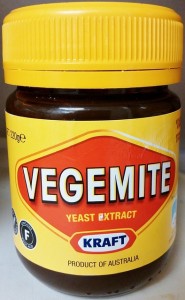
Vegemite


Vegemite is uniquely Australian and most Aussies have a jar of Vegemite in their house. We even have our own Vegemite song! It’s a dark brown food paste made from leftover brewers’ yeast, vegetables and additives.

Our favourite way of eating Vegemite is on toasted bread with a layer of margarine (or butter) spread with a thin layer of Vegemite.

While some might say Vegemite is an acquired taste — the true secret to eating Vegemite is the thin layer of Vegemite on toast. Most of the hilarious taste testing Vegemite videos on YouTube are caused by trying to eat Vegemite like you would Peanut butter, Nutella or Jam.
Aussie Meat Pies

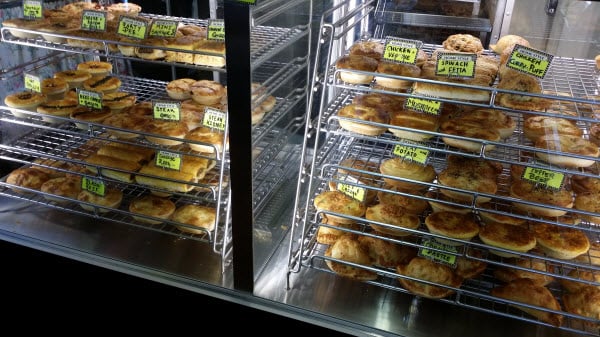
The Meat pie is considered iconic in Australia and New Zealand. These are hand-sized meat pies made up of diced or minced meat and vegetables.

Most Australian bakeries sell a wide variety of meat pies, sausage rolls in addition to bread and cakes. Meat pies and sausage rolls are a common lunch food here and you can also buy them at most lunch bars and petrol stations.


Selection of pies and sausage rolls at a bakery


Each bakery has their own unique recipes.

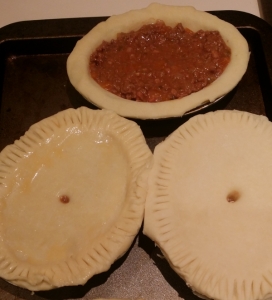
You might enjoy making meat pies with your students. It isn’t hard.

Here are some tips:

Follow this Curtis Stone Meat Pie recipe.
Make the filling in advance and wait until it is completely cooled until you use it to fill the pies (I don’t add the chicken livers).
You eat the pie by holding it in your hand.
Food in other Countries

A challenge with visiting other countries is sometimes the food you are used to isn’t available or is hard to get.

Watch Brian Lockwood video where he discusses the challenges of buying bread in China. Brian is an American teacher who works at a school in Nanjing, China.


Activity 1: 

Write a post on food, songs, stories or clothing that is popular in your country.

In your post, include links to where you researched and some images with attribution. You might also want to a collage of images or a slideshow you have created.

Activity 2: 

Visit Inside Scoops Taco Tuesday post to learn what their students eat for lunch. Leave a comment on Taco Tuesday post to let them know what you eat for school lunches in where you live or write a post to share what school lunches are like where you live.

Activity 3:

Create a poll or survey and embed it into a post to find out more about the types of foods eaten by your readers or songs sung, stories told or clothing worn.

Activity 4:

Visit at least 5 blogs from countries other than your own. Leave a comment on a post at each blog to ask them questions about food, songs, stories or clothing in their country. Now write your own post including the comment you have left and linking to each post you commented on.

Sunday, 3 April 2016

Student Blogging Challenge - Week 5

Student Blogging Challenge - Week 5 - Images & Sounds

Student Blogging Challenge - Week 5 - Images & Sounds

There is a lot to learn in this challenge so it will be running for a two week (fortnight) period. The next challenge will be posted on 17th April

Teachers: Here is a lot of information regarding images, creative commons and copyright which you can use with your students or to refresh yourself about what is acceptable or not on public blogs. Also one of our mentors in 2014, Maria, has put together some lists with great tools when using images and audio. The Edublogger also has a post on free image sources. Above the challenge blog header is a page containing a symbaloo with many tools to use on your blog – many relate to images.

Students and teachers please read this before doing the activities

This week’s activities are going to be fun but first there are some things you need to know so please read carefully.

I have been visiting many blogs over the last few weeks. Some students new to blogging have been writing some great posts while others who have been blogging for a bit longer have started adding videos and images to their posts.

Yes, this week we deal with using images, music and sounds in your posts.

But can’t I use any image, music or sound that is on the internet?

No, you must use creative commons or in some cases the fair use rule.

But where can I find these images, music and sounds? Can’t I use anything when I google an image?

No, your blog is public so you must use creative commons images, sounds, music and videos.

Sue Waters over at the teacher challenge has written a fantastic post about images, copyright and creative commons. I would suggest you all head over there to read the post. She explains about creative commons and the licences, attribution, how to find images for your blog and how to upload images to your blog. Most of this would be appropriate whether you are using Edublogs, blogger or any other blogging platform. This might be very wordy for some students, but Sue uses lots of images and how to do sections in her posts.

Other places to find information

- Head to the creative commons website.
- Check out the CC wiki to find out what is happening in your country. What are the different licenses used?
- Teachers check out the education section of creative commons.
Youtube allows creative commons for videos.
Teachers: A fantastic guide to copyright, fair use and creative commons has been written by Ronnie Burt and I would suggest you read this to understand more about using images, music and video on your blogs. Also includes what might happen if you use an image etc incorrectly.
Larry Ferlazzo also has a great “Best List for images” that you might want to check out as well.

OK I want to use some legal creative commons images and music in my slideshow.Where can I go to get them?

Do you have compfight plugin for your blogging platform? Follow the instructions from Sue Waters’ post.

Maria, a mentor from 2014, created some lists of tools to use with images and audio.

Other places to get images and music:

You will need to work out how to get the attribution to put on your posts. Check Sue Waters’ post to get more help and more places for images. This post from Edublogs explains how to add media in all its forms to your blog posts or pages. If using blogger, check out the posts from this blog.

Images

Morguefile
Open ClipArt
Pics4learning

Make sure you check out the links under creative commons in the sidebar of the challenge blog.

Music and sound effects

JamendoCCMixter, post with 14 websites for music, post with 20+ websites for music, post with 55+ sites with sound effects
Now for the activities for this fortnight

Activity 1 - Watch this video about sharing work and write a post about what you learned. Include words such as attribution, share alike, licences and derivatives to show you understand what the video was about. Do some more research on the topic and perhaps create your own class video about using images, music and videos in class.


This video is the reaction of students in Mrs Yollis’ class when she mislabelled their artwork. How would you have felt?


Activity 2 - Check out this story using remix and fair use of video. What was interesting, positive or negative about it? Could you and your friends create a 20 second video using remix and fair use? Mrs Miller’s class left some comments on her blog about creative commons


Activity 3 - Find an image or piece of music. Add it to your post (with attribution) and write a poem relating to the image or music. Invite your readers to write their own poems. Here isFernando’s example, Samantha is confused

Activity 4
 - Similar to activity 3. Find an interesting landscape image (include attribution). Write the beginning of a story relating to your image. Remember to include a conflict of some sort between your characters. Invite your readers to finish the story. How many different endings can you get? Which ending do you prefer? You might need to visit some other bloggers and invite them to finish your story. Remember to leave the URL of your post for them to click on.

Activity 5 - Write a sentence using just images – no words. You still need to include attribution for each image you have used.

Activity 6 - Find 5 images that create a story – again no words only the attribution for each image.

Activity 7 - Create a slideshow, photo gallery or poster about your interests to add to your about me page or as a separate post. Your final slide should include attribution for each image.

Activity 8 - Create your own images and add to a post of your choice. In your post add a link to the website or tool you used to create your image.

Other options for creating your own images include:

Image Generators such as ImageGenerator.org
Comic Generators like MakeBeliefsComix.comToonDoo
Photo Editors like Befunkyfd’s Flickr Tools
Tag Cloud Creators such as Wordle

Mixing up your images using these types of tools can really spice up your posts! Leave a comment on this post, if you or your class can recommend some other image sites to add to this list.

Activity 9 - Zoom out from an image

We first tried this activity in the challenge in September 2010. Choose a picture, and have your readers zoom out, so to speak, by leaving comments. Check out the example from Huzzah who finished their story. If doing this activity, include the word ‘zoom’ in your title so I can find it easily. Remember to give attribution. Most important here is to read previous comments, so you can add to the story.

Check out these zoom pictures: BeckyJacquelineAbbey
Activity 10 - Go back to previous posts

If you have used images in any previous posts you have written, then you are ethically obliged to give the correct attribution or take the image out of the post if it does not have the right creative commons license. Check out where Holly found her image, Samudraalso wrote a great post,

Activity 11 - Create a jigsaw from your image. Mrs Schmidt’s class has done this using Jigsaw Planet Here is her explanation

Last week (2014) my students made some jigsaw puzzles about famous places in our area. First each student created one Power Point Slide showing a photo and some facts about a location in our area. They saved the slide as a JPEG and then uploaded it toJigsaw Planet. Once the puzzle was created, they published a link to it on their Kidblog. Click on Niamh’s puzzle link.

Activity 12
 - Write a post about different websites to find creative commons images. Are there any widgets you can add to your blog to make this easier?

Still got time left this fortnight (two weeks)

1. Visit other student and class blogs – leave some quality comments

2. Reply to comments on your own blog

3. Start using tags and categories with each post you write to make it easier for people to find posts on certain topics. Make sure you have the tags and categories widgets in your sidebar.

4. Have at least five other student blogs linked on your sidebar – students from other classes and schools – not your own. We will need this for a game we play in a couple of weeks.

Try to have a few different headings like
My Blogging Friends
Other Class Blogs

Having lots of links to student blogs from other countries will help spread the game.

Here are the instructions for adding links to your sidebars.

EdublogsBloggerKidblog – not sure if this widget goes on the class page or each student page
Most important learning from this fortnight’s challenge is:

Use creative commons images, not just any image on the net. Always include attribution of where you found the image. Compfight plugin does this for you.

PS If you have done the blogging challenge before, you will find these activities are nearly the same each time. If you have ideas for different activities please leave a comment on this post.

UPDATE UPDATE UPDATE

Miss W will only be adding posts to the flipboard magazine that:

- Are written in paragraphs
- Have been proofread
- Include an image, sound or video with attribution

So make sure you have taken note of this week’s learning about creative commons.

Miss W visiting your blogs

From this week onwards, I will only be visiting blogs where students or classes have left theURL to the post in a comment with an explanation. If your teacher is moderating your posts, you will need to wait until it has been published before giving me your URL. Check out the difference between a blog URL and a post URL.

Blog URL: http://studentchallenge.edublogs.org

Post URL : http://studentchallenge.edublogs.org/2015/10/10/raise-your-voice/

Sunday, 20 March 2016

Blogging Challenge 3

#16stubc - Protect The Places We Love


Protect The Places We Love

Every year, the students and classes taking part in the blogging challenge also try to join this special event held in March annually.

The event relates to Earth Hour

Here is a link explaining why we celebrate Earth Hour and how it has progressed since the first one held in Australia in 2007.

Many countries are holding different themes this year – check them out here. As you can see, Australia is going with

Protect The Places We Love

So over this week please do some of the following:

-Home Learning- Switch off your lights for at least an hour starting at 8.30pm on Saturday night.
-Home Learning Write a post about what you did in that hour as a family – did you keep your lights off longer than an hour?
- Write a post about the places you want to protect – might be a favourite beach or the Great Barrier Reef or a mountain track you use often or a picnic area you always go to on weekends
- What thing related to climate change would you like to see fixed by all countries around the world by the time you are 50 years old? What could you do to help make that fix?
- Add the Earth Hour badge to your blog – right click on the image below and save to your computer. Add to your sidebar using the image widget

Sunday, 13 March 2016

Student Blogging Challenge Week 2

Student Blogging Challenge - Week 2 - I can comment


Week 2  - I can comment...


An overview of this weeks tasks:

Activity 1: Leave a comment on the post.

Activity 2: Practicing commenting on a class blog

Activity 3: Write a post, create a video or create a poster about commenting.

Activity 4: Visit other student or class blogs